
A calmer sidebar, rebuilt from your feedback
We rebuilt the dashboard sidebar because you told us it wasn't working. Your feedback was consistent: the sidebar felt cluttered, the section headings looked like things you could click, the pages you use every day were buried, and in dark mode a hovered row looked exactly like the selected one. Here is what we heard, and what changed for each.
Every page is still there and nothing is hidden. No page is tucked away by role or plan, and no route changed, so your bookmarks keep working.
"It feels cluttered"
The old sidebar mixed large headings, an accordion inside the Links section and a tall footer with your profile, a Log out button, the theme switch and two version lines. On a laptop screen that footer pushed half the navigation below the fold.
Now the sidebar is four flat sections: Links, Pages, Developer and Workspace. The footer is a single account row. A few pages also got clearer names: Link previews (formerly Metadata), Mobile apps (formerly Manage Apps), Request logs (formerly Logs) and Team (formerly Accounts). The General section is now Workspace.
"The headings look clickable"
Section headings used to be the biggest text in the sidebar, yet clicking them did nothing. They are now small, muted labels that read as labels. The rows underneath are the things you click.
"The pages I use are buried"
Three changes bring your pages closer:
- New link is a button at the top of the sidebar, so creating a link is always one click away.
- Pinned. Hover any page and press its pin to keep it in a Pinned section at the top, up to six pages. A pinned page also stays in its own section.
- Frequent. Pages you open often show up under Frequent automatically. It stays empty until you have some history.
"Hover and selected look the same in dark mode"
In dark mode the selected page and any page under your pointer used to share the same bright pill. The selected page now has its own blue tint, and hover has a fainter colour of its own, so you can always tell where you are from where you are pointing.
More room when you need it
The « button next to your account row collapses the sidebar to a slim icon rail instead of hiding it. Every icon has a tooltip, and the sidebar remembers which way you left it.
Before and after
The old sidebar on the left, the new one on the right, both on the API keys page with sample data.
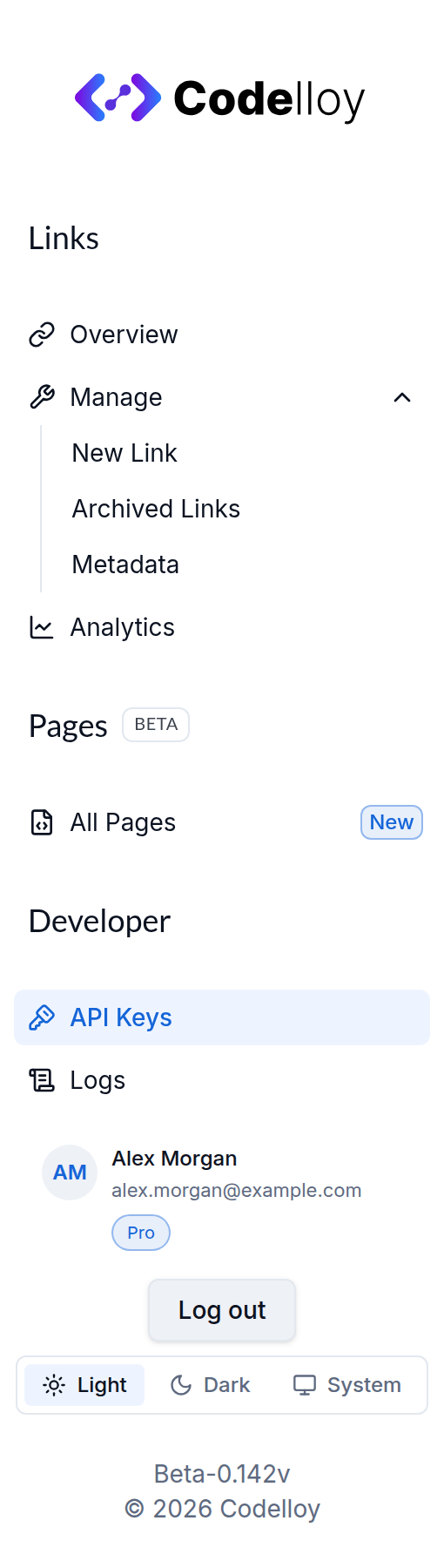 Before: the old sidebar, with large headings, a Manage accordion and a tall footer pushing the General section out of view
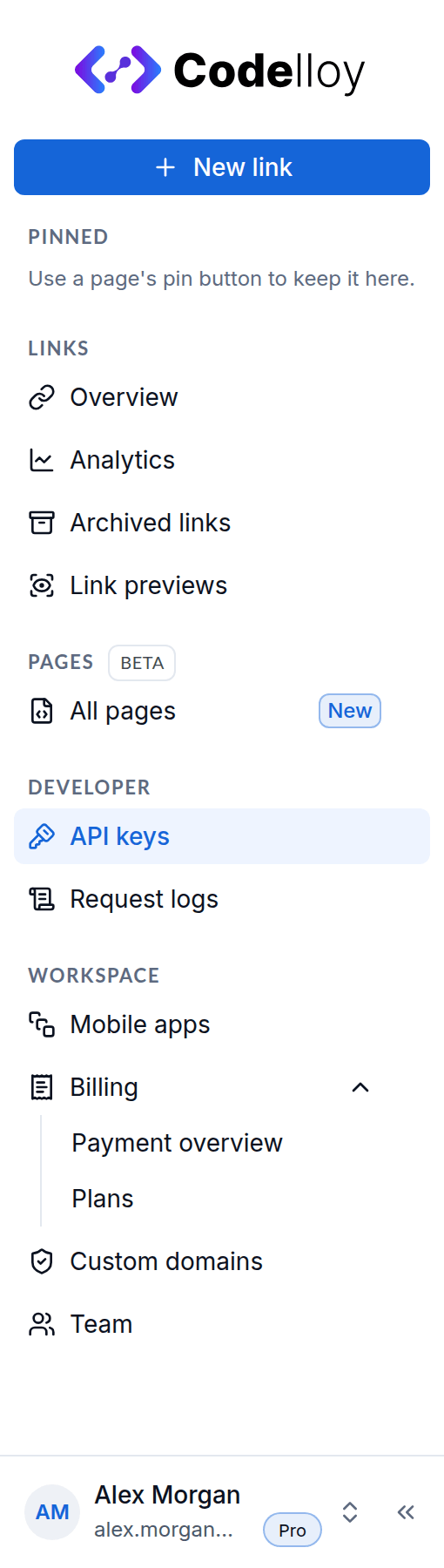 After: the new sidebar, with a New link button, Pinned, and the Links, Pages, Developer and Workspace sections above a single account row
Where the account controls went
Your account row opens the account menu: Plan & upgrade, Team, the Light, Dark and System Theme switch, Help & docs and Log out. The dashboard version line moved into the account menu too, below Log out, so you and our support team can still check which version you are running.
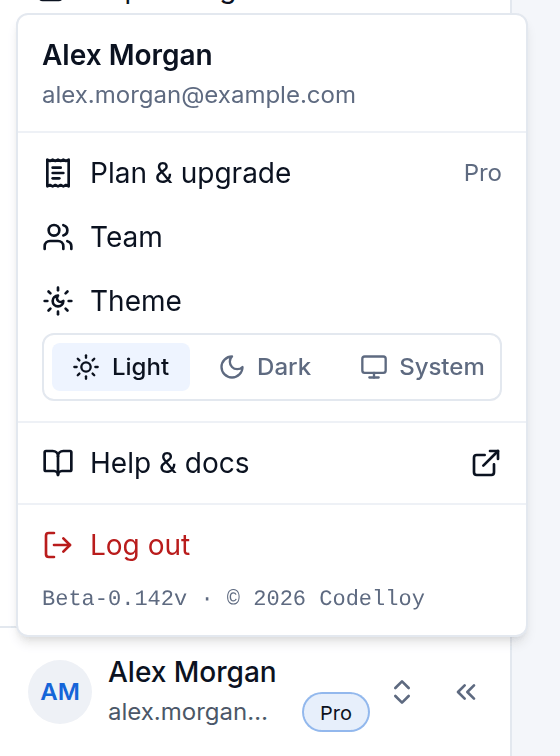 The account menu open from the account row: Plan & upgrade, Team, Theme, Help & docs, Log out, and the version line at the bottom
Where to find things
If you are used to the old sidebar, here is the short version:
| Page | Where it is now |
|---|---|
| New link | The New link button at the top |
| Link previews (formerly Metadata) | Links → Link previews |
| Request logs (formerly Logs) | Developer → Request logs |
| Mobile apps (formerly Manage Apps) | Workspace → Mobile apps |
| Team (formerly Accounts) | Workspace → Team, or Team in the account menu |
| Billing | Workspace → Billing, or Plan & upgrade in the account menu |
| Light, Dark or System theme | Theme in the account menu |
Our docs already use the new names. If something you rely on feels harder to reach now, tell us through the contact page. Your feedback shaped this sidebar, and it will shape the next round too.